Car Contents Insurance
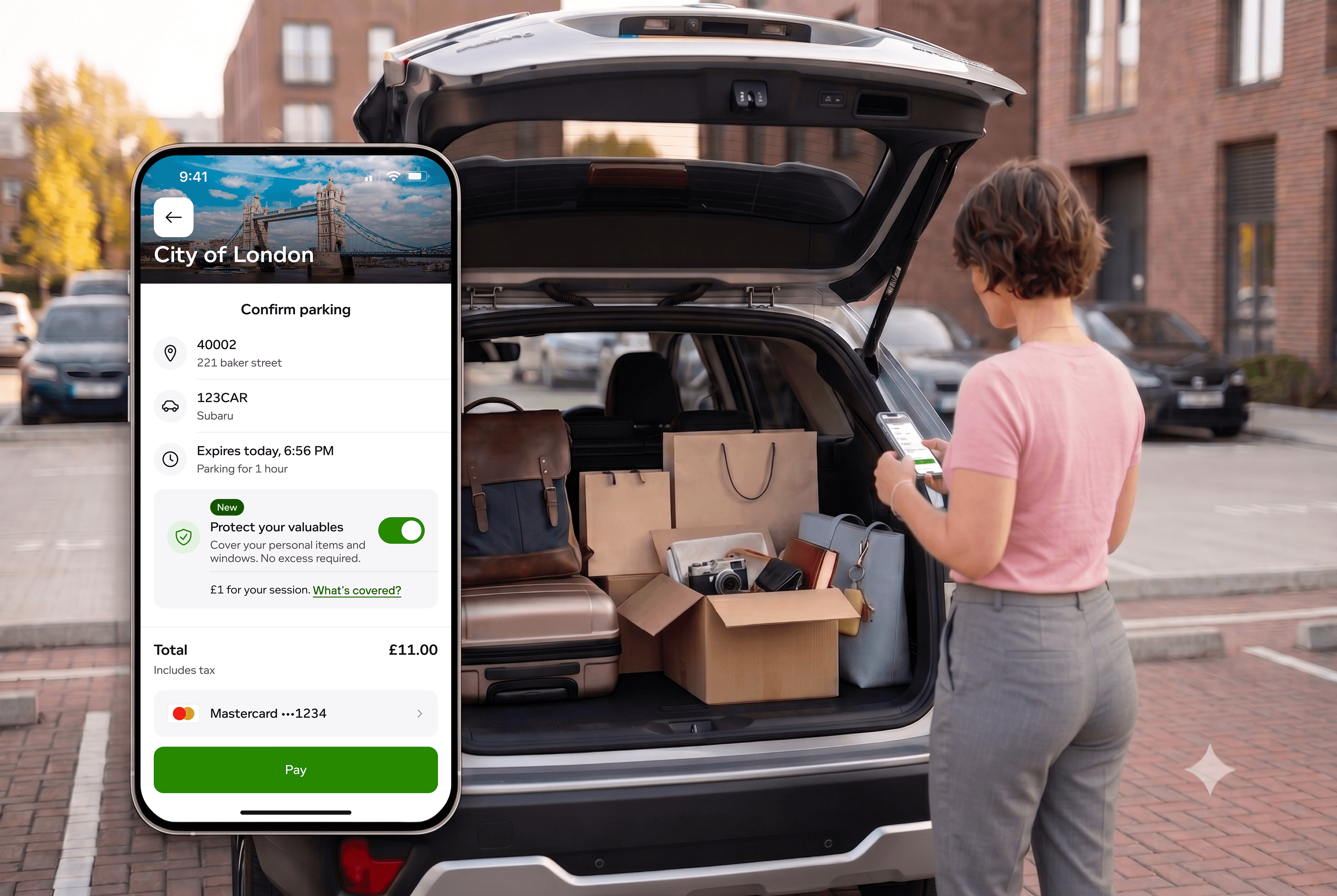
A 0-to-1, session-based insurance add-on that lets parkers protect their belongings. Designed end to end and launched to 2M+ users.
Role
· Product Design Lead
Team
· 1 PM, 10+ Devs, 2 Legal experts
Duration
· 8 months
Year
· 2024
+60%
conversion lift, A/B tested
2M+
monthly users reached
+568%
boost in feature visibility
The Challenge
Anxiety in the parking lot
Add a serious insurance product to a fast parking app without adding a single step of friction.
Car break-ins were rising, and people felt uneasy leaving valuables behind. That opened a new revenue stream: quick, session-based insurance, underwritten by Chubb, offered the moment users felt most vulnerable. The hard part is the mismatch: insurance is a considered, "serious" purchase, while PayByPhone is a fast utility people open to pay and go.
How might we
…add an optional insurance add-on inside the parking flow, with zero friction?
Constraints
Designing inside real limits
This wasn't a blank canvas. Three real constraints shaped how I approached it, and made the problem more interesting than "design an insurance screen."
A regulated product
Insurance is regulated: coverage, exclusions, and consent all had to be shown clearly and lawfully. I worked with two legal experts to turn those requirements into something simple, not a wall of fine print.
A third-party underwriter
Chubb underwrites the policy and handles claims. I owned the in-app experience, but the claim itself sits with Chubb, so part of the job was making that hand-off clear and trustworthy.
MVP speed, real scale
The first release had to be lean. With a tight window and 10+ engineers, I designed within existing components and shipped the most valuable version first, inside an app already used by millions.
So the problem wasn't "design an insurance screen." It was making a regulated, partner-backed product feel as quick and calm as the rest of the app.
Validation
Proving the bet before designing
Before designing anything, I validated real demand and the features users wouldn't buy without.
QUANT · Fake-door test
Simulated the product live to 50,000 parkers. Interest beat our internal revenue goals, product-market fit confirmed.
QUAL · User research
20 sessions surfaced the deal-breakers: people would only buy with no excess (nothing to pay out of pocket on a claim) and no impact on existing premiums.
The thread that runs through this
One finding stuck: "no excess" was the thing people cared about most. It shaped the value proposition, and months later an A/B test proved it out with a 60% lift in conversion.
Explorations · Low-fidelity wireframes
Designing the friction-free flow
Two decisions, each made to protect the core parking flow: where to place it, and how to explain coverage.
Entry point: where it enters the flow

Full-screen
✗ Added a screen

Expand / collapse card
✗ Crowded the screen

Confirm-screen toggle
✓ Selected · one tap to add
Coverage overlay: how to explain it

Tabs
✗ Legal: Need all coverage on one screen

Expand / collapse
✗ Legal: users may miss reading required details

Scannable text
✓ Selected · all on one screen
Selection criteria: I chose the options that best fit my design principles (fast & simple, clarity & confidence, rapid development) and were technically feasible for the MVP.
Final design · High-fidelity screens
The shipped experience
One tap on the Confirm Parking screen, clear coverage, and a persistent "protected" status for peace of mind. The numbered steps trace the full tap-through, and you can watch it run in the In Motion clip below.

1 · Entry point for protection
Toggle protection on →

2 · Coverage details
Tap "Add protection" →

3 · Coverage added
Tap "Pay" →

4 · Processing payment
Payment processes →

5 · Protected parking session
Tap "Manage" →

6 · Manage protection
Manage or claim anytime
Why these details
Opt-in by default
The toggle stays off until the user chooses it; a serious purchase is never pre-checked.
"No excess" leads
The deal-breaker from research gets top billing in the value line.
Price up front
The session cost sits on the card, before the user commits, so there are no surprises.
Honest disclosure
Chubb is named before you buy, and you agree to the policy terms right where you commit. Nothing is buried.
Accessible by default
Links don't rely on colour alone, text meets contrast standards, and tap targets keep their distance from each other.
Built to localise
The copy and layout hold up when text runs longer, French is about 20% longer, and nothing breaks.
Success metrics
How we defined success
Before launch, I set clear success metrics with the PM, so we'd know if the feature was working, and where to dig if it wasn't.
App Store sentiment
Review sentiment in line with comparable features in the app.
Support load
Support-request-to-transaction ratio in line with parking.
Parking funnel conversion
No meaningful drop in the core parking flow.
CCI conversion rate
Meets or beats the target.
Exact targets are under NDA.
Collaboration & delivery
Shipping it, not just designing it
A regulated, partner-backed feature at this scale was never a solo design job. I worked across product, engineering, legal, marketing, and Chubb to shape it, build it, measure it, and launch it.
Journey map & MVP scoping
With the PM, I built a journey map to decide what shipped first and what could wait. It's where the hard calls got worked out, how we'd handle email, consent, and sharing plate details with Chubb.

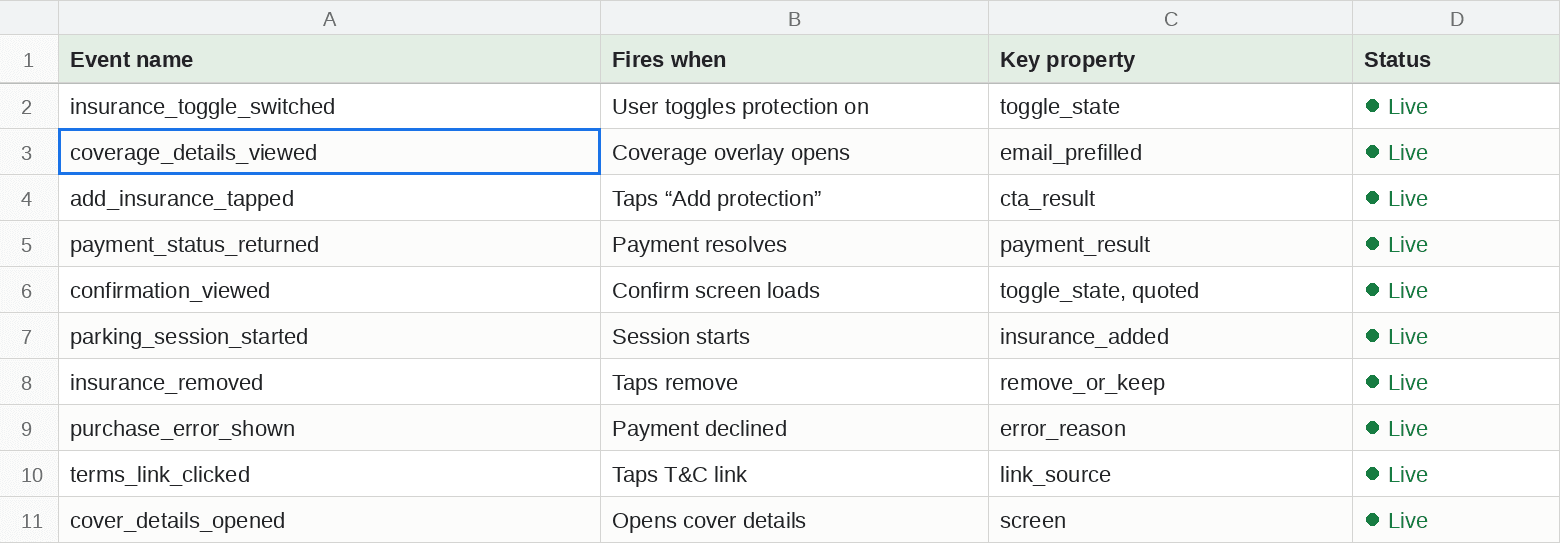
Event tracking
I defined the analytics events for every step. This is what later let me find that 47% of users never saw the feature.
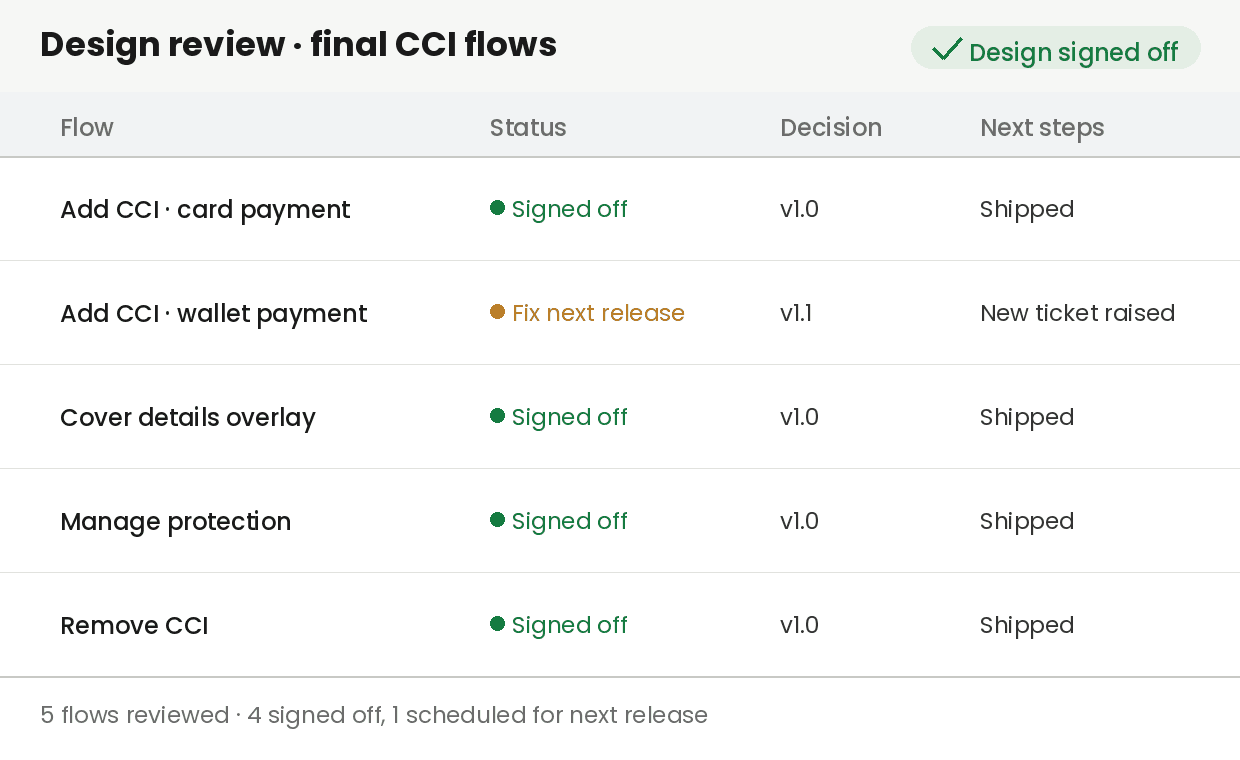
Design QA
I stayed close through build, checking flows against the design down to margins and error states.
Marketing
I worked with marketing on the Chubb co-branded landing page and the email receipts.

The Plot Twist
Launch wasn't the finish line
Low conversion sent me back to the data, and two A/B tests turned the feature around.
Gap 1 · Visibility
47% of users never saw the feature, the subtle MVP design hid it.
Gap 2 · Value
Those who saw it didn't convert, the value wasn't landing fast enough.
Experiment A: Visibility
Hypothesis: a bolder, higher-contrast placement would get the feature seen.
Control
Original subtle placement

Variant 1
Coverage details as pills

Variant 2 · Winner
High-contrast + New tag

Why it won: the winning treatment stood out against the rest of the confirm screen and used a "New" tag, so the feature finally got noticed at the moment people were deciding.
Clicks on the insurance toggle went up 568%.
Experiment B: Value proposition
Hypothesis: leading with a single, concrete benefit would convert better than multiple claims.
Control
Original multi-claim copy
Variant 1
Copy around peace of mind
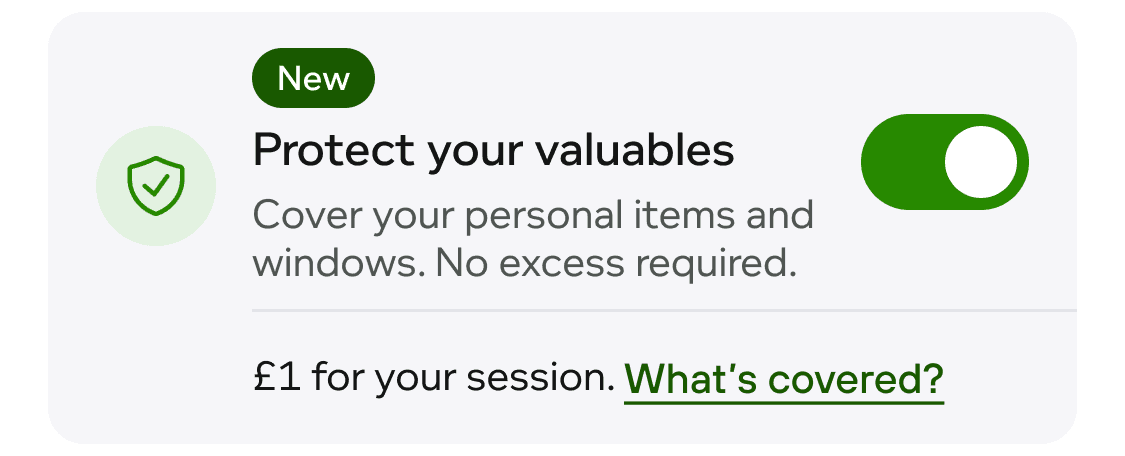
Variant 2 · Winner
Single "no excess" claim

Why it won: it led with the single "no excess" claim, the exact thing research had flagged. One clear benefit was easier to take in than a list, and it spoke to what people actually worried about.
Conversion went up 60%.
The rescue came back to one research finding: "no excess" wasn't just something people said, it was the thing that turned the feature around.
In motion
The whole journey, end to end
From the Confirm Parking toggle to a persistent "protected" status, the full add-insurance flow runs without a single extra step.
Results & Impact
From a raw idea to a scalable revenue stream
A new revenue stream at real scale, a rescued conversion rate, and validation in the national press.
2M+
monthly users on the feature
+60%
conversion after the A/B rescue
+568%
visibility lift
1.2M
readers, front page of Le Parisien
Reflection
What I'd carry forward
Shipping was the start of the design problem, not the end. We'd defined success metrics up front, but the plan to act on a miss only came together after launch. The post-launch data taught me more than any pre-launch test, and turned a flat result into a 2M-user win. Next time I'd build the experimentation and iteration plan before launch too, not just the metrics, so we can respond the moment a target slips.